
A node-locked license ties a software license to a specific device, so one license activates on exactly one machine. It works by binding the license key to a hardware fingerprint, usually a combination of disk serial, motherboard ID, and MAC address. This model fits offline installs, regulated environments, and single-user workstations best, trading portability for tighter piracy control.
TL;DR:
- Node-locked licenses typically rely on multiple hardware signals like motherboard UUID, disk serial, and CPU ID to resist spoofing and reduce false positives.
- Allowing self-service deactivation and reactivation options minimizes support tickets caused by hardware changes or device replacements.
- Licensing policies should be tailored to security needs, with tighter restrictions for regulated environments and more flexibility for consumer software.
- Using fuzzy fingerprint matching with a tolerance threshold helps licenses survive minor hardware changes, such as replacing a hard drive or BIOS updates.
- Off-line activation via signed license files is essential for air-gapped systems and reduces support overhead for hardware-related licensing issues.
Table of Contents
- How Node Locked Licensing Works Under the Hood
- Choosing Between Strict and Transferable Node Locking
- Anti-Spoofing Measures That Actually Hold Up
- Reducing Support Load With Better Activation Policy
- Node-Locked vs Floating Licensing: A Quick Decision Guide
- A Shipped Example: Hardware Verification in Practice
- What "Node-Locked" Actually Means (and Its Other Names)
- Where Node-Locked Licensing Shows Up Most
- The Vendor's Side: Why Node-Locked Licensing Is Harder Than It Looks
- Legal and Compliance Considerations for Node-Locked Licenses
- Fixing the Most Common Activation and Validation Errors
- What Happens When Hardware Changes
- An Editor's Take on Getting the Balance Right
- An Easier Path: Hardware-Verified Licensing Without Building It Yourself
- Sources
- FAQ
How Node Locked Licensing Works Under the Hood
The technical flow behind node-locked licensing is simpler than most developers expect, but getting the details right separates a robust implementation from a support headache. Node-locked licensing binds a license record to a device fingerprint the moment activation happens, and every later launch checks that fingerprint against what's stored.
The activation sequence typically runs in four steps:
- Key entry. The user enters a license key issued at purchase.
- Fingerprint generation. The client software builds a hardware identifier from stable components like disk serial number, motherboard UUID, or CPU ID.
- Server binding. An activation request sends the key and fingerprint to a license server, which binds the hardware ID to that key and returns a signed activation token.
- Local validation. The client stores that proof locally and checks it on every launch, sometimes with periodic revalidation against the server.
Fingerprint source matters more than most guides admit. MAC addresses change when someone swaps a network card. Disk serials survive OS reinstalls but not drive replacements. Motherboard IDs are the most stable single signal on desktop hardware, which is why LicenseSpring's platform leans on multiple fingerprint algorithms rather than one field alone.
For air-gapped systems, offline activation uses signed license files instead of live server calls. According to Nalpeiron's licensing documentation, this pattern lets the software validate cryptographic proof locally, with revalidation happening only when the machine eventually reconnects.
Choosing Between Strict and Transferable Node Locking
Not every node-locked deployment behaves the same way once it's live. The two big policy decisions are how tightly you bind the license and how many activations you allow per key.
Strict binding permanently ties a license to one device with no self-service transfer. Once activated, the customer has to contact support to move it. Transferable node locking lets the customer deactivate on one machine and reactivate on another, sometimes with a capped transfer count per year. Keygen's implementation guide frames this as strict versus non-strict, and the choice usually comes down to how much support overhead you're willing to absorb versus how much piracy risk you'll tolerate.
Activation count is the other lever:
- One activation per key for high-security, single-workstation installs.
- A small number of activations for typical desktop-plus-laptop customer setups.
- Configurable limits tied to license tier, so enterprise buyers get more flexibility than individual users.
Virtual machines complicate fingerprinting because VM hardware IDs can look identical across clones or shift on every reboot depending on the hypervisor. A workable approach uses fuzzy fingerprint matching with a tolerance threshold, so a license survives a minor hardware change (a new hard drive) but flags a suspicious jump (a completely different motherboard and CPU signature).
Pro Tip: Score fingerprint matches instead of requiring an exact match. If four out of five hardware signals still match after a component swap, auto-approve the reactivation instead of forcing a support ticket.
Anti-Spoofing Measures That Actually Hold Up
Weak fingerprinting is the most common reason node-locked licenses get cracked. A single hardware signal, like a MAC address, is trivial to spoof with freely available tools. The fix is layering.
- Build composite fingerprints from at least three independent hardware signals (disk serial, motherboard UUID, CPU identifier).
- Sign every activation token cryptographically so a modified license file fails validation instantly.
- Store activation proof in tamper-evident local storage, not a plain text file a user can copy between machines.
- Run periodic online checks even for otherwise offline-capable software, catching license sharing that pure local validation misses.
- Log activation attempts server-side and flag anomalies, like the same key activating from IP addresses on different continents within hours.
Deep implementation guidance recommends server-side diff scoring across fingerprint fields rather than brittle exact-matching, particularly for cross-platform tools running on Windows, macOS, and Linux where hardware identifier availability differs by OS.
Legacy schemes are worth avoiding entirely. Vendors like Accusoft have deprecated older node-locked approaches in favor of signed-license or hybrid SaaS-backed activation, largely because single-field fingerprinting proved too easy to defeat. A license scheme built on one weak signal isn't a security control. It's a speed bump.
Reducing Support Load With Better Activation Policy
Most node-locked licensing headaches aren't technical. They're operational. A customer replaces a laptop, calls support, and waits three days for a manual reset. Good policy design prevents that entirely.
- Set activation counts to match real usage. A developer who works from a desktop and a laptop needs two activations, not one.
- Build a self-service portal where customers can view active devices and release one themselves, cutting support tickets dramatically according to LicenseSpring's field data.
- Automate stale-device cleanup. If a device hasn't checked in for 90 days, release its activation slot automatically instead of making the customer file a request.
- Document escalation paths clearly, so edge cases (hardware failure mid-project, RMA replacements) have a defined support workflow instead of ad hoc exceptions.
Node-Locked vs Floating Licensing: A Quick Decision Guide
The choice between these two models comes down to how your customers actually work, not which one sounds more modern.
- Choose node-locked for single workstations, offline or air-gapped installs, and regulated environments where auditors want a license tied to a named machine.
- Choose floating (concurrent) licensing for teams sharing a pool of seats, environments with frequent hardware turnover, or organizations that add and remove staff regularly.
- Hexagon's support documentation frames the core distinction simply: node-locked binds to one machine, floating serves concurrent users through a license server.
- Many vendors offer both tiers, letting enterprise customers pick per department rather than forcing one model company-wide.
A Shipped Example: Hardware Verification in Practice
Web2Luau, a desktop toolchain built for Roblox UI developers, runs hardware-verified licensing as a core feature rather than a bolt-on. The self-contained executable operates fully offline, checks its license against the local machine's hardware fingerprint, and still supports CLI automation for CI/CD pipelines. It integrates with Roblox Studio through the Model Context Protocol for live updates without file copying, showing that hardware-locked licensing and modern developer workflows aren't mutually exclusive.
What "Node-Locked" Actually Means (and Its Other Names)
If you've seen this concept called something else, you're not wrong. Node-locked licensing goes by several names depending on the vendor and the era of documentation you're reading: machine-locked licensing, single-use licensing, anchored licensing, or simply named-host licensing. They all describe the same core mechanic: a license tied to one identifiable device through a hardware fingerprint, as opposed to a license that floats across a network pool.
The alternate naming isn't just trivia. It matters when you're evaluating vendor documentation or licensing SDKs, because a search for "machine-locked" or "single-use license" will surface tooling that's functionally identical to what "node-locked" describes elsewhere. According to Wikipedia's overview of node-locked licensing, the term originated in enterprise software and CAD tooling, where binding a license to a specific workstation was the default model long before SaaS subscriptions existed.
The common thread across every name is the fingerprint. Whether a vendor calls it node-locked, machine-locked, or anchored, the license validates against a hardware identifier collected at activation time. The differences show up in implementation details, like how strict the binding is and whether transfers are allowed, not in the fundamental concept. If you're building or buying a licensing system and a vendor uses unfamiliar terminology, checking for these synonyms first will save you from re-researching a concept you already understand.
Where Node-Locked Licensing Shows Up Most
Node-locked licensing dominates in industries where a single machine, not a person, is the unit that matters. CAD and engineering software is the classic example: AutoCAD-style tools historically shipped node-locked because engineering workstations are expensive, dedicated, and rarely shared mid-project.
Regulated industries lean on node-locked models for compliance reasons. Medical device software, financial trading systems, and government contractor tools often require an auditable link between a license and a specific, documented machine, since floating licenses complicate compliance reporting when auditors ask "which machine ran this software on this date."
Manufacturing and industrial control software follows a similar pattern. A PLC programming tool or a factory floor diagnostic suite typically runs on one dedicated terminal for years, making node-locking a natural fit with no real downside since the machine never moves.
Game development and creative tooling increasingly use node-locked models too, particularly for indie and small-team tools where a lifetime license tied to a developer's primary machine keeps pricing simple and piracy manageable without the overhead of running a floating license server. Scientific computing and lab instrumentation software rounds out the list: a spectrometer control application or a genomics analysis tool often ships node-locked because the software is inseparable from the physical hardware it drives.
The Vendor's Side: Why Node-Locked Licensing Is Harder Than It Looks
Building a node-locked licensing system looks straightforward from a spec sheet and gets complicated fast in production. Vendors underestimate three things consistently: hardware fingerprint churn, cross-platform inconsistency, and the support cost of edge cases.
Fingerprint churn is the quiet killer. A customer's laptop gets a firmware update that changes how the BIOS reports its UUID, and suddenly a legitimate license fails validation. Multiply that across thousands of customers running different hardware configurations, and a vendor with a brittle exact-match fingerprint system ends up drowning in false-positive support tickets.
Cross-platform inconsistency compounds the problem. Windows, macOS, and Linux expose different hardware identifiers with different stability guarantees, so a fingerprinting library that works reliably on Windows might behave unpredictably on Linux distributions where hardware reporting varies by kernel version and driver stack.
The support cost is what actually shows up on a vendor's balance sheet. Every "my license won't activate" ticket costs real engineering or support time to resolve, and node-locked systems generate more of these tickets than floating or subscription models simply because hardware changes happen constantly. Vendors that invest early in self-service device management and tolerant fingerprint matching cut this cost substantially. Vendors that don't end up building that infrastructure reactively, under pressure, after the ticket volume becomes unmanageable.
Legal and Compliance Considerations for Node-Locked Licenses
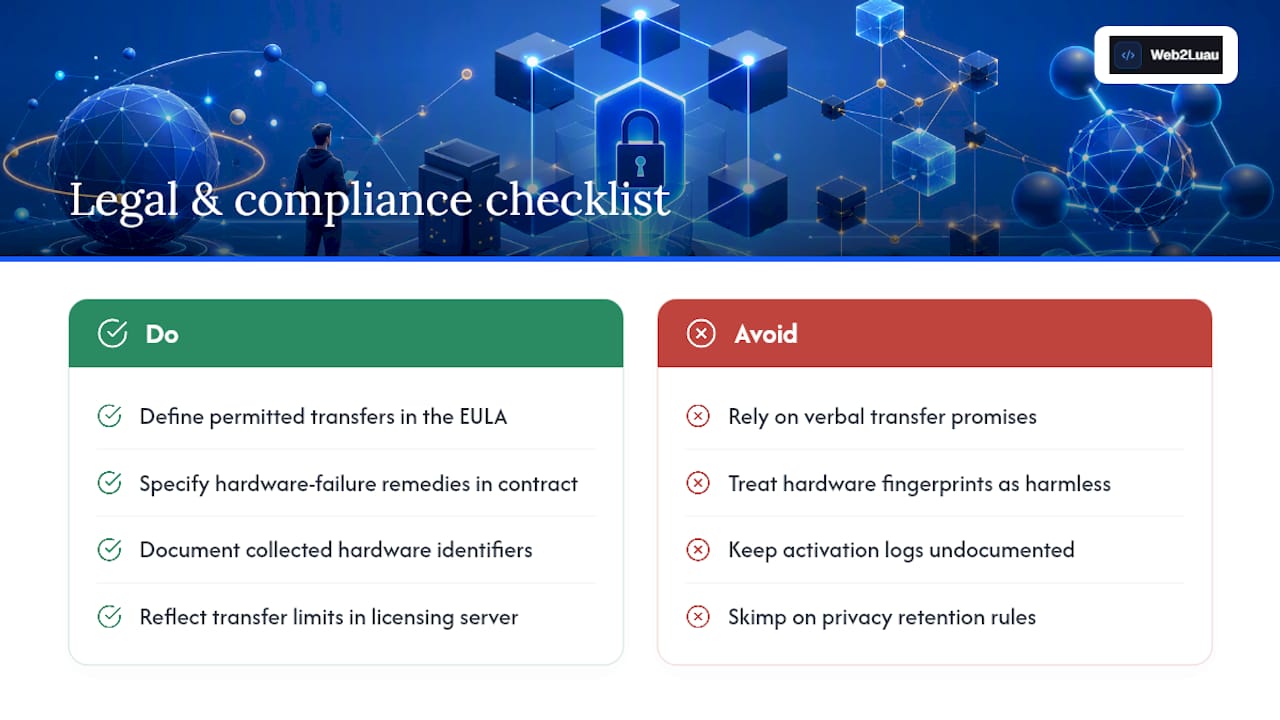
Node-locked licensing carries specific legal weight that other models don't. Because the license explicitly names or fingerprints a device, the end-user license agreement (EULA) needs to spell out exactly what counts as a permitted transfer, what happens on hardware failure, and whether the license survives a company asset transfer (an employee leaving, a device being sold).
Audit compliance is where node-locked licensing often earns its keep. Industries with strict software asset management requirements, like finance and healthcare, benefit from the auditable one-to-one relationship between a license and a machine. When a compliance auditor asks which licensed copies exist and where, a node-locked system with clean activation logs answers that question far more cleanly than a floating pool where any authorized user could have been running the software at any time.
Data privacy adds another layer worth thinking through before you ship a licensing system. Hardware fingerprints can qualify as personal or device-identifying data depending on jurisdiction, so vendors collecting MAC addresses, disk serials, or other hardware identifiers should document what's collected, how long it's retained, and whether it's transmitted to third-party licensing infrastructure. This isn't usually a dealbreaker, but it's a line item that belongs in a privacy policy rather than something discovered after a customer asks.
Contract terms around transfer limits also carry real legal weight in B2B software agreements. If an enterprise customer negotiates unlimited transfers or a grace period for hardware refreshes, that needs to be reflected in both the contract language and the actual licensing server configuration, not just a verbal understanding between sales and the customer.
Fixing the Most Common Activation and Validation Errors
Most node-locked licensing failures fall into a handful of predictable categories, and knowing the pattern speeds up diagnosis considerably.
"License already activated on another device" usually means the customer is reinstalling on new hardware without deactivating the old installation first. The fix is a clear deactivation step in your uninstallation or offboarding flow, plus a self-service portal where the customer can release the old activation themselves.
"Hardware fingerprint mismatch" typically follows a driver update, BIOS change, or component swap that shifted one or more fingerprint fields. If your matching logic requires an exact match across every field, even a single changed component triggers a false failure. Fuzzy matching with a tolerance threshold, as discussed earlier, resolves most of these automatically.
"Activation server unreachable" hits offline-capable software when the initial activation call fails due to firewall rules or network restrictions common in corporate and regulated environments. Providing a manual offline activation path, where the customer submits a fingerprint file and receives a signed license file back, sidesteps this entirely.
"Signature verification failed" on a signed license file almost always means the file was copied or edited outside the intended activation flow, which is actually the anti-spoofing system working as designed. Support teams should treat these carefully rather than reflexively reissuing a license, since a real signature failure often indicates a legitimate customer error, not fraud.
What Happens When Hardware Changes
A dead hard drive or a motherboard replacement shouldn't turn into a licensing crisis, but it does more often than it should because vendors under-plan for the reactivation path. When a fingerprint field changes significantly, most systems fall into one of three responses: automatic tolerance-based approval, a manual reactivation request, or an outright license lockout.
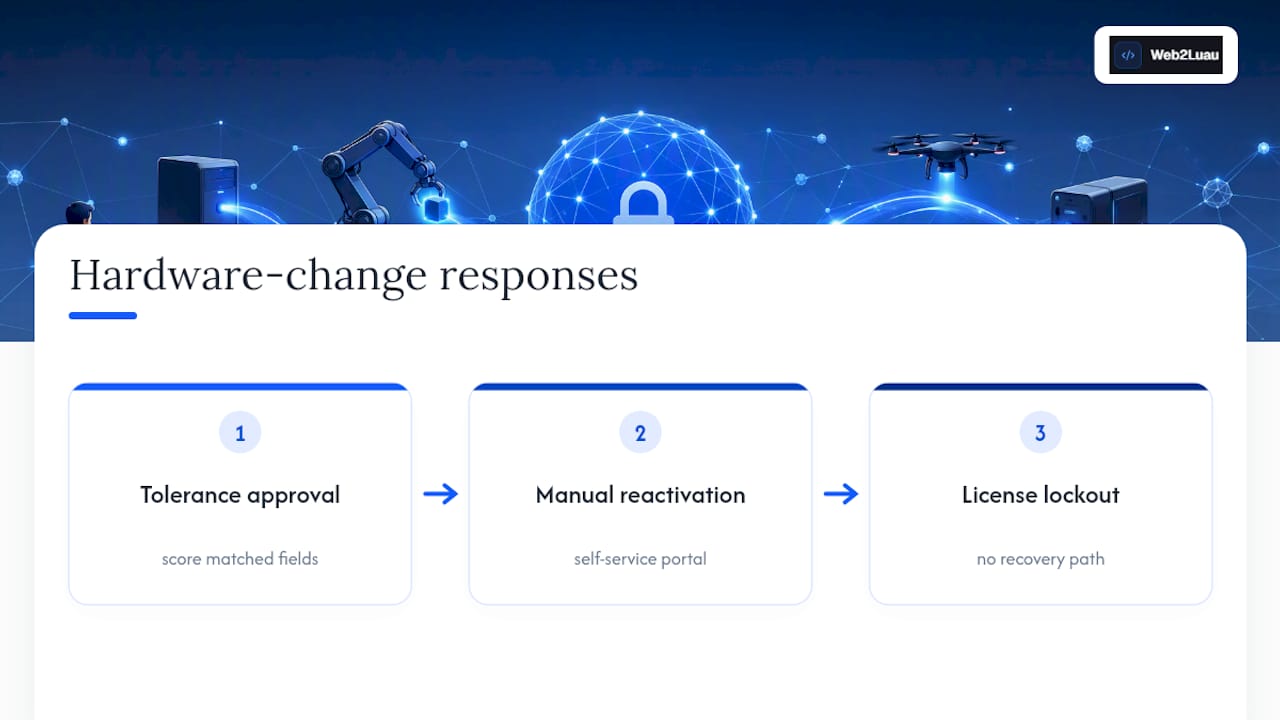
Tolerance-based approval is the best customer experience and the hardest to build correctly. It requires scoring how many fingerprint fields still match rather than demanding perfection, so a new hard drive (one changed field) doesn't fail the same way a completely different machine (five changed fields) does.
Manual reactivation is the fallback most vendors ship first, and it's reasonable as long as the process is fast. A self-service portal where a customer can deactivate their old device and immediately activate the new one, without waiting on a support agent, keeps this from becoming a friction point. LicenseSpring's approach to device management leans heavily on this self-service model precisely because manual, agent-mediated reactivation doesn't scale past a few hundred customers.
Outright lockout, where a hardware change simply breaks the license with no recovery path, is the scenario that generates the angriest support tickets and the worst reviews. It's avoidable with almost any of the patterns above, which is why building at least a basic self-service reactivation flow should be considered part of the minimum viable licensing system, not a later enhancement.
An Editor's Take on Getting the Balance Right
Security and customer experience don't have to fight each other in node-locked licensing. Favor convenience for consumer tools, strictness for regulated ones. Whatever policy you pick, spell it out in plain language before purchase. Vague transfer rules generate more support tickets than any technical flaw.
— Selix
An Easier Path: Hardware-Verified Licensing Without Building It Yourself
Building a fingerprinting system, activation server, and self-service portal from scratch is months of engineering work most small teams can't spare. Web2Luau Studio & CLI Suite ships with hardware-verified licensing already built in, so Roblox UI developers get the security of a node-locked model without writing a single line of license-validation code.
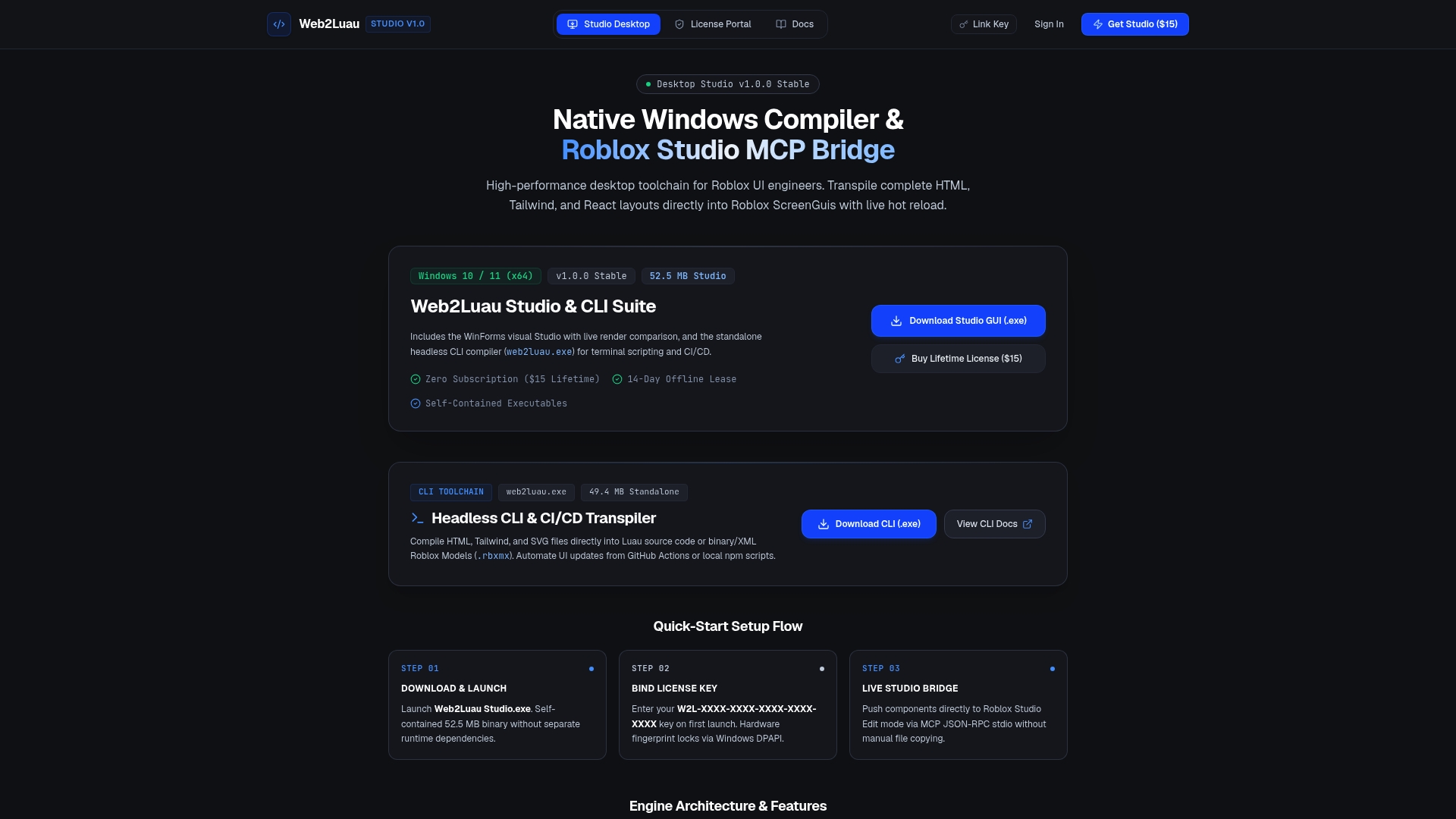
The toolchain runs as a self-contained executable that operates fully offline, transpiling HTML, Tailwind, and React layouts directly into Roblox ScreenGuis with live hot reload and direct Studio integration through the Model Context Protocol. CLI automation supports CI/CD pipelines for teams that need repeatable builds, not just interactive editing. It's a one-time purchase at $15, with no subscription and no recurring license server to maintain on your end. If you're evaluating whether to build custom licensing infrastructure or adopt a tool where that problem is already solved, the Web2Luau product page is worth a look before you start writing your own activation server.
Sources
- Node-locked licensing
- Node-Locked Software Licensing - LicenseSpring
- How to Implement a Node-Locked Licensing Model
- What is a node-locked license? | Nalpeiron
FAQ
What Does a Node-Locked License Mean?
A node-locked license ties a software license to one specific device using a hardware fingerprint, so it only runs on the machine where it was activated.
What Is the Difference Between a Node-Locked License and a Floating License?
A node-locked license binds to a single machine, while a floating license allows concurrent use across a team through a shared license server pool.
What Does Node Lock Mean in Software Licensing?
Node lock refers to binding a software license to a unique hardware identifier, like a disk serial or motherboard UUID, so it can't run on unauthorized machines.
Does Web2Luau Use Node-Locked Licensing?
Yes. Web2Luau uses hardware-verified licensing built into its self-contained executable, letting it run fully offline while still enforcing per-device activation.
How Much Does Web2Luau Cost?
Web2Luau Studio & CLI Suite is a one-time purchase of $15 with no subscription required.